
The best free PDF apps for iPhone in 2026
The short version: for reading, signing and filling forms, the best free PDF app for iPhone is the one you already have. Files with Markup and, since iOS 26, Preview cover most everyday jobs at no cost. Install something when you need what they leave out: redaction, splitting, compressing to a set size, page numbers or watermarks. Among the apps below, Adobe Acrobat Reader, PDF Expert and Xodo keep the basics free and charge for editing; iLovePDF and Smallpdf give a few tasks a day; Kyneto PDF lets you use every tool and limits how many documents you export.
The other question that separates them is whether your document leaves the phone.
Start with what is already on your iPhone
Files and Markup. Open a PDF in Files and the Markup button adds text, shapes and your signature, which iOS saves for reuse. The viewer also lets you rearrange pages.
Preview (iOS 26 and later). Apple's dedicated PDF app fills forms with AutoFill from your contact card, highlights and marks up, adds, deletes, rotates, reorders and crops pages, locks a PDF with a password, scans paper into a PDF, and exports with a size slider. Its export can also run OCR to make a scan searchable. The guide to the Preview app covers it in full.
Neither involves a third-party service or costs anything. Apple's iPhone guides do not cover redaction, splitting a PDF into several files, compressing to a size you type, page numbers or watermarks.
The comparison
| App | Free version covers | Paid plan needed for | Does the document leave the phone? |
|---|---|---|---|
| Files + Markup, Preview | Reading, forms, signatures, markup, page edits, export, scanning | Nothing | Built into iOS; no third-party service |
| Adobe Acrobat Reader | Opening and viewing, comments and highlights, filling and signing, sharing | Creating, editing, exporting to other formats, combining, organising pages, compressing, password protection | Adobe says files changed with subscription features are synced to Adobe cloud storage |
| PDF Expert | Annotating, filling forms, signing | Editing text, adding, deleting and reordering pages, compressing, converting, redacting | Its privacy notice says files are stored temporarily, up to three hours, for conversion |
| Xodo | Viewing and annotating, for personal use | Its 30+ tools, including Office conversion, redaction and high compression | The App Store listing does not say |
| iLovePDF | A limited number of tasks a day, plus unlimited reading | Premium, to remove the daily cap | Its terms say some mobile tools need an internet connection |
| Smallpdf | Tasks within a daily limit | Pro, for unlimited tasks | Yes: its listing says uploaded files are deleted one hour after processing |
| Kyneto PDF | Every tool; the free tier limits how many documents you can export | A weekly or yearly subscription removes the limit | No: every tool runs on the iPhone |
Checked on 2026-11-10 against each product's App Store listing, help pages and privacy notice. Plans change; read the current listing before you rely on a row. Prices are left out on purpose: the in-app purchase lists show several tiers per app and vary by country.
The apps, briefly
Adobe Acrobat Reader. The free tier is generous for reading, commenting, filling and signing, and you do not need an Adobe account to read. Editing, combining, organising pages and compressing are part of Acrobat Premium. A good pick if you already pay for Acrobat on a computer.
PDF Expert. A polished reader from Readdle. Annotation, form filling and signatures are free; editing text, page management, compression, conversion and redaction are Premium.
Xodo. Xodo says viewing and annotating stay free for personal use. Its subscription covers the rest, including Office conversion and redaction. Its listing does not say where its tools process files.
iLovePDF and Smallpdf. Both are web services first, with apps on top. The free tiers allow a limited number of tasks a day. Smallpdf states that files are uploaded and deleted after processing, and iLovePDF names its desktop app, not the mobile one, as the version that runs locally. Fine for a public document; a poor fit for a payslip or a passport scan.
Kyneto PDF. Every tool runs on the iPhone, with no account and nothing uploaded, so it works offline too.
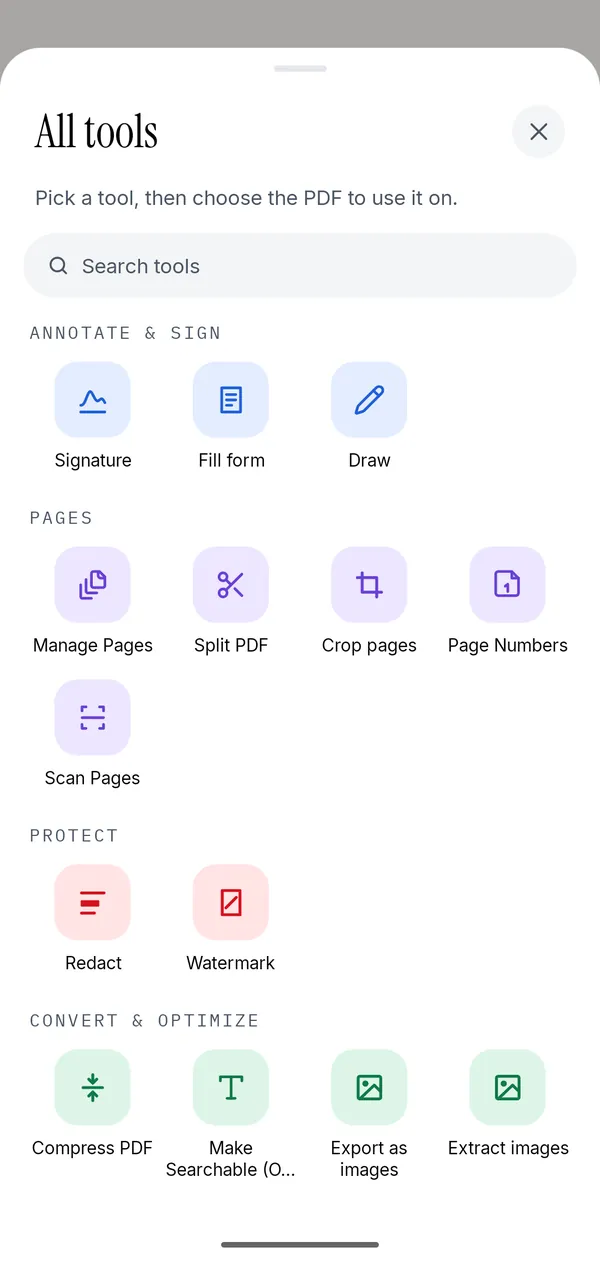
It covers the gaps Apple leaves: Redact that deletes the text underneath, Compress PDF with a Target File Size field, Split PDF by page ranges or by file size, Page Numbers, Watermark and Remove Password for a file you can open. It also runs Make Searchable (OCR), signs, fills forms, adds text and images, scans with Apple's document camera, merges PDFs and turns photos into a PDF. It is free to download and every tool can be used; the free tier limits how many documents you can export, and a weekly or yearly subscription removes that limit.
What it does not do: edit the existing text in a PDF, convert a PDF to Word, apply a certificate-based or qualified signature, or open a file whose password you do not know. For the first two, Acrobat or PDF Expert's paid tiers are the better fit.
How to choose
- Reading, signing, forms: Preview and Markup. Install nothing.
- A confidential document (ID, payslip, medical letter): an app that keeps the file on the phone. Kyneto PDF, or Apple's own tools for what they cover.
- A file that must fit an upload or email limit: something that compresses or splits to a size. Kyneto PDF does both.
- Rewriting text or converting to Word: Acrobat Premium or PDF Expert Premium.
- You already work in a browser: iLovePDF or Smallpdf, for documents that are not sensitive.
The Android roundup applies the same test, offline or not, to the Android side.
Questions people ask
What is the best free PDF app for iPhone?
For everyday reading, signing and form filling, Apple's Preview (iOS 26 and later) and Files with Markup are free and built in. For redaction, splitting, compressing to a size or watermarks, add an app such as Kyneto PDF, which runs every tool on the phone.
Is there a free PDF editor for iPhone?
Yes, with limits that differ by app. Acrobat Reader and PDF Expert keep annotating and signing free and charge for editing. Kyneto PDF lets you use every tool and limits how many documents you can export on the free tier.
Which free PDF apps for iPhone do not upload my files?
Apple's built-in Preview and Files involve no third-party service, and Kyneto PDF runs every tool on the iPhone. Smallpdf uploads files for processing, and Acrobat syncs files changed with subscription features to Adobe's cloud.
Can a free iPhone app edit the existing text in a PDF?
Not the free tiers covered here. Acrobat Premium and PDF Expert Premium edit existing text. Adding a text box on top is free in Markup, Preview and Kyneto PDF.
Is Adobe Acrobat Reader free on iPhone?
The app is free, and so are opening, commenting, filling and signing. Editing, combining, organising pages and compressing need Acrobat Premium.
Free to download. No account, nothing uploaded.