
The best offline PDF apps for Android in 2026
The short version: Kyneto PDF, Xodo and PDFgear all do real editing work on an Android phone with the connection off. Adobe Acrobat reads offline but puts most of its editing behind cloud services. iLovePDF and Smallpdf are web services with an app wrapper, so their core tools need a connection and a round trip to a server. Pick by whether the file is allowed to leave your phone.
"Offline" is used loosely in app listings, so it is worth being precise about what it can mean.
Three different meanings of "offline"
- Opens files offline. Almost every PDF app qualifies. It tells you nothing.
- Edits offline. The merge, split, compress and signature operations run on the device's own processor.
- Never uploads. Stronger than (2): even when there is a connection, the document is not sent anywhere, because there is no server in the product at all.
Meaning (3) is the one that matters for a payslip or an ID, and it is the one listicles never check.
The comparison
| App | Edits offline | Uploads your document | Account required | Notes |
|---|---|---|---|---|
| Kyneto PDF | Yes, every tool (the scanner may need a one-time download) | No | No | Merge, split, compress to a size, sign, OCR, redact, watermark; free tier limits exports |
| Xodo | Yes, most tools | Optional, for its cloud and sharing features | Optional | Long-standing annotation and form-filling app |
| PDFgear | Yes, for local editing | For the AI features | No, for local editing | Free; the assistant features are server-side |
| Adobe Acrobat | Reading and basic markup | Yes, for most conversion and editing tools | Yes, for the paid tools | Deepest feature set, most of it tied to Document Cloud |
| iLovePDF | No, for the core tools | Yes | Optional | Web service first; the app is a front end to it |
| Smallpdf | No, for the core tools | Yes | Yes, for most tools | Web service first; strong desktop workflow |
Compiled on 2026-10-19 from each product's own documentation and store listing. Features move; check the current listing before you rely on a row. Nothing here is a judgement of quality — Acrobat and Smallpdf are good products that happen to be built around a server.
Where Kyneto PDF fits
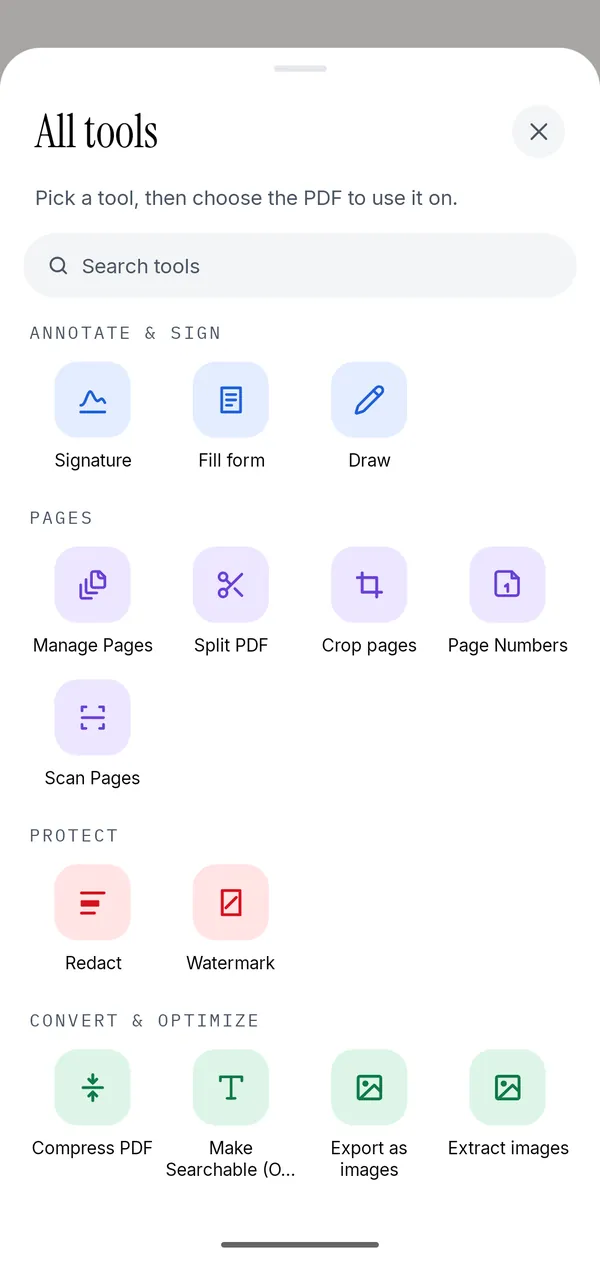
Kyneto PDF is a free Android app (iPhone version coming soon) that merges, splits, compresses, signs, scans, redacts and annotates PDF files entirely on the device, with no account and nothing uploaded. It covers merging, splitting by range or by file size, extracting pages, deleting and reordering pages, compressing to a size you type, signatures, form filling, annotation, redaction, watermarks, page numbers, scanning with on-device OCR, removing a known password, and converting between images and PDF.
It is free to download. The free tier limits how many documents you can export; a subscription removes the limit. It has no account, so there is no sign-up step and nothing to be breached.
What it does not do: edit the existing text inside a PDF, convert a PDF to Word or Excel, apply a qualified or certificate-based electronic signature, or recover a password you do not know. If you need any of those, one of the other apps in the table is a better fit.
How to choose
- The file is confidential — an ID, a payslip, a medical letter, a signed contract. Choose an app that never uploads. Kyneto PDF, or Xodo with its cloud features switched off.
- You are often without a connection. Same answer, for a different reason.
- You need PDF to Word, or a qualified signature. Acrobat or a dedicated signature provider. No offline app will do this well.
- You already live in a desktop workflow. Smallpdf and iLovePDF are good at that, and their apps are a reasonable extension of it.
Questions people ask
Which PDF app works completely offline on Android?
Kyneto PDF runs every tool on the device, including compression and OCR, and has no account. One caveat: Scan Document uses Google's ML Kit document scanner, which Google Play services may download the first time you scan, so open it once while connected. Xodo and PDFgear also do most local editing offline.
Is there a free PDF editor for Android that does not upload files?
Yes. Kyneto PDF is free to download and processes documents on the phone; the free tier limits how many documents you can export. PDFgear's local editing is also free and local.
Does Adobe Acrobat work offline on Android?
It opens and marks up PDFs offline, but most of its conversion and editing tools run in Adobe's Document Cloud and need a connection and a sign-in.
Do iLovePDF and Smallpdf upload my document?
Yes, for their core tools. Both are web services, so the file is sent to their servers and processed there. That is fine for a public document and a poor fit for a confidential one.
Can an offline app do OCR?
Yes. On-device OCR is well within what a modern phone can do. Kyneto PDF's Make Searchable runs locally.
Free to download. No account, nothing uploaded.