
Sign a PDF on your phone without printing it
To sign a PDF on a phone without printing it, open the document in Kyneto PDF, tap Signature, draw your name with a finger, then drag the signature onto the line and resize it. Export the signed PDF and send it. The signature is stored on the device and can be reused on every later document.
Print, sign, scan, email is a twenty-minute errand that produces a crooked grey photocopy. None of it is necessary.
Sign a document in four steps
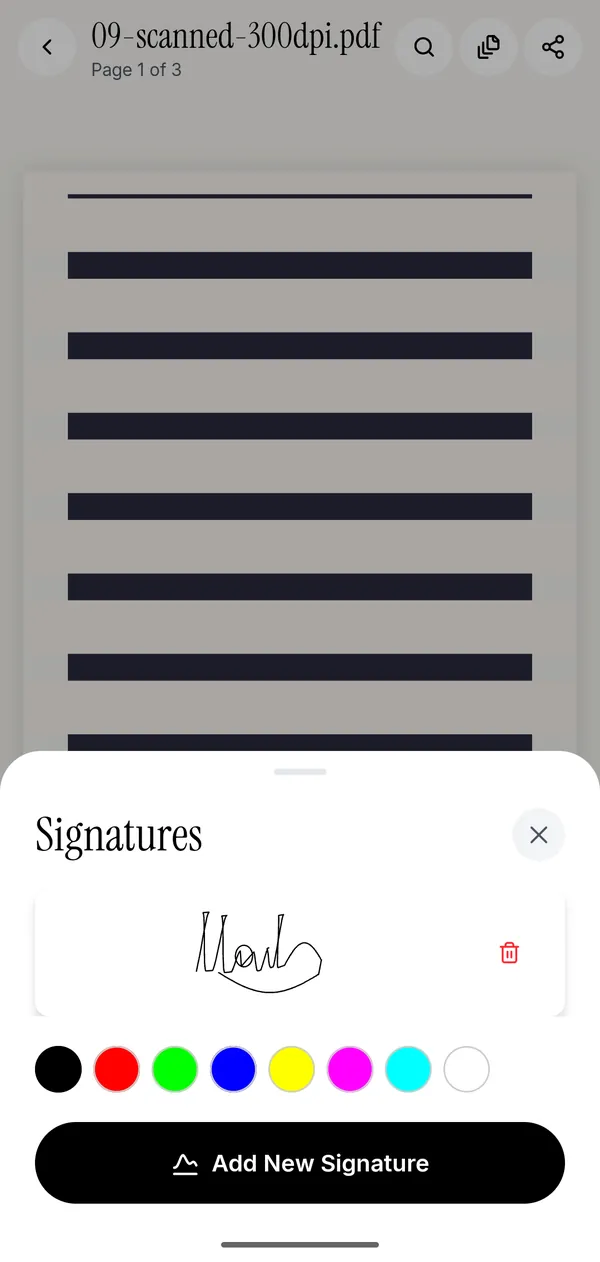
- Open the PDF and tap Signature in the toolbar at the bottom of the editor.
- Draw your signature with a finger or a stylus. Take the second attempt: the first one is always the worst one.
- Place it on the signature line, then drag the corner to size it. Signatures look best a little smaller than you expect.
- Tap export and share the finished PDF straight from the app.
The signature is saved, so the next contract takes about fifteen seconds. You can keep more than one, which is useful if you sign both with a full name and with initials.
Also fill in the date and the name fields
Most documents that need a signature also need a date and a printed name next to it. Two tools cover that:
- Fill form works on a PDF that has real form fields in it. Text boxes, checkboxes, radio buttons and dropdowns behave like the controls they are, and the values are written into the form itself.
- Text places a text box anywhere on any page, which is what you need for the flat, scanned contracts that have no fields at all.
If the page is a photograph of a paper form, use Text. If tapping a box makes a keyboard appear on its own, it has real fields and Fill form is the better tool.
Is a drawn signature legally valid?
In most everyday situations, yes. Under eIDAS in the EU and the ESIGN Act in the United States, a simple electronic signature — which is what a drawn signature is — can be legally binding, and courts generally accept it for ordinary commercial agreements.
What it is not is a qualified electronic signature. A QES in the EU, a signature with an Italian CIE, a Spanish certificado digital, or a Brazilian ICP-Brasil certificate are all cryptographic signatures backed by an identity check, and some documents require exactly that: notarial deeds, certain filings with the public administration, some employment paperwork. Kyneto PDF draws a signature on the page; it does not issue a qualified certificate. If a form specifically asks for a qualified or certificate-based signature, use the tool your government points you at.
For a rental agreement, an NDA, a delivery note, a school form or a freelance contract, a drawn signature is what everyone involved expects.
Why do it on the device
A signature page carries your name, your address and often your bank details, and signature images are the kind of thing you do not want sitting in somebody's upload bucket. Kyneto PDF does the placing, the flattening and the export on the phone. There is no account, so there is nothing to sign up for and nothing to be breached.
It also means the whole thing works on a train with no signal, which is where contracts always seem to arrive.
Questions people ask
How do I sign a PDF on an iPhone without printing it?
Kyneto PDF for iPhone is coming soon; today the app is on Android only. On an iPhone you can already sign with Apple's built-in Markup: open the PDF in the Files app, tap the Markup button, tap + and choose Add Signature, then place it on the line. Nothing is printed and nothing is uploaded.
Can I reuse the same signature on other documents?
Yes. The signature you draw is saved on the device and offered again the next time you open the Signature tool. You can keep several and pick between them.
Is a signature I draw with my finger legally binding?
For ordinary agreements, usually yes: it is a simple electronic signature, which eIDAS and the ESIGN Act both recognise. It is not a qualified electronic signature, so documents that specifically require a certificate-based signature need a different tool.
How do I sign a PDF that is password-protected?
Open it with its password first. If you then want to share a copy that opens without a prompt, use Remove Password before exporting.
Does signing a PDF in Kyneto PDF upload it anywhere?
No. The document stays on the phone from the moment you open it to the moment you share it.
Free to download. No account, nothing uploaded.