
Compress a PDF to 100 KB on Android, offline
To compress a PDF to 100 KB on Android, open the file in Kyneto PDF, choose Compress PDF, switch to Target File Size, enter 0.09 MB and apply. The field takes megabytes, and 0.09 MB is about 94 KB, safely under the limit. The app shows an estimate before it writes anything and does the whole job on the phone, so the document is never uploaded to a website.
That is the short answer. The rest of this guide covers what the slider actually does, why some files refuse to shrink, and what to do when the result is still too big.
Why the upload form rejected your file
Government portals, job boards, visa applications and insurance claim forms all set a maximum attachment size, and the number is usually small: 100 KB, 500 KB, 2 MB. A PDF made by a phone scanner routinely comes out at ten times that, because a scan is really a set of photographs and photographs are heavy.
The usual fix is a compression website. That means uploading a payslip, a passport scan or a signed contract to a server you know nothing about. For an ID document that is a bad trade, and it is unnecessary: the arithmetic involved in shrinking a PDF is well within what a phone can do on its own.
Compress to a size you type
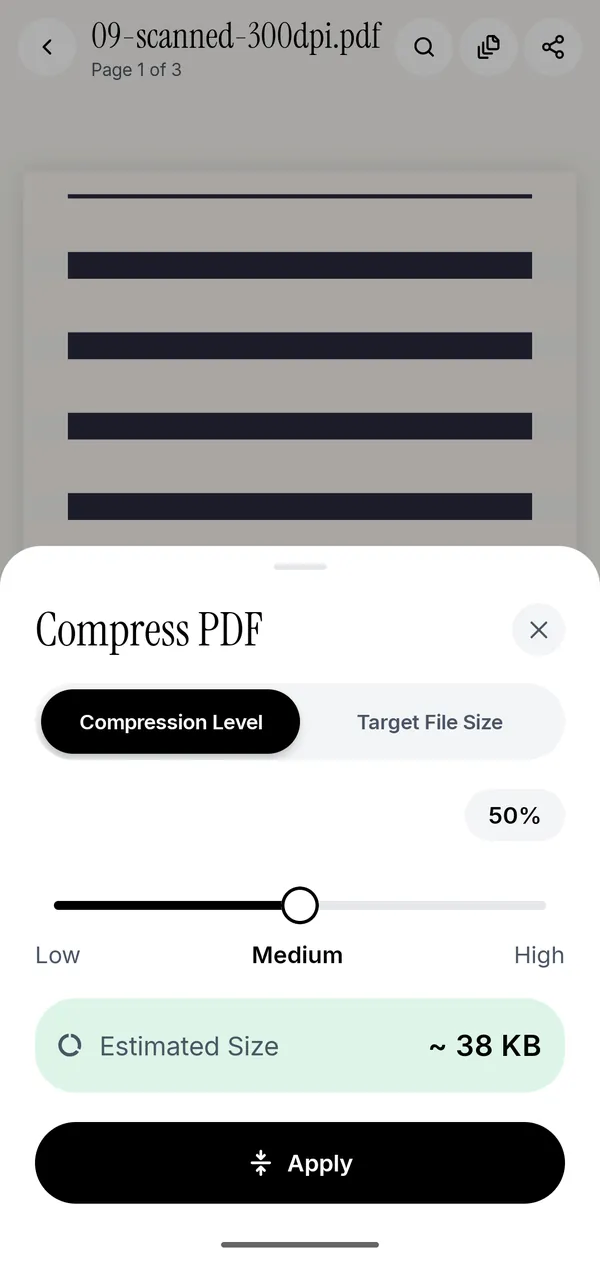
- Open the PDF in Kyneto PDF. Tap All tools at the bottom of the editor.
- Choose Compress PDF under Convert & optimize.
- The sheet opens on Compression Level, a Low-Medium-High slider with a live estimate underneath.
- Tap Target File Size instead and type the limit the form allows in megabytes. For a 100 KB limit enter 0.09, because 0.1 MB is about 102 KB and just over.
- Check the estimate, then tap Apply. The compressed copy is saved on the device.
The estimate matters more than it sounds. Most tools make you run the compression, look at the result, undo it and try again. Seeing the predicted size before the file is touched turns three or four rounds into one.
If compressing would make the file bigger, it is left alone
A PDF that is already tightly packed, or one that is nothing but vector text, can come out larger after a re-encode. Kyneto PDF keeps the original in that case rather than handing you a worse file. If the app tells you the document is already as small as it will get, the next step is not more compression.
What to do when 100 KB is out of reach
Some documents genuinely cannot reach a small target without becoming unreadable. Three things usually help more than squeezing harder:
- Drop the pages you do not need. A six-page bank statement where the form only wants page one is six times bigger than it has to be. Use Manage Pages to delete pages, or Split PDF to extract the range you need.
- Crop the margins. A photographed page often carries a desk, a hand and a lamp around the edges. Crop pages hides that. Cropping alone does not shrink the file, but Compress PDF keeps only the visible area, so crop first and the desk is gone once you compress.
- Split by file size. If the form accepts several attachments, Split PDF → File size cuts the document into parts that each stay under the limit you set.
Does compressing a PDF lose quality?
Yes, and that is the point. Compression turns every page into a JPEG image at a lower resolution and quality. Text softens too and can no longer be selected, copied or searched, and form fields and links are lost. A scan, which is already a picture, shrinks a lot and gets softer as it goes. A text-only PDF usually gets bigger as images, which is why the app keeps the original then.
For an upload form, soft is fine as long as it is legible. For something you will print, stay nearer the Low end of the slider and lose a few pages instead.
Questions people ask
How do I compress a PDF to 100 KB on Android for free?
Install Kyneto PDF, open the document, choose Compress PDF, switch to Target File Size and enter 0.09 MB, which lands under 100 KB. The app is free to download and runs the compression on the phone, so no connection and no upload is involved.
Can I compress a PDF without uploading it to a website?
Yes. Kyneto PDF compresses a PDF entirely on the device. The file, its name and its contents never leave the phone, which is what you want for a payslip, an ID or a contract.
Why did my PDF not get smaller?
Because its pages would not get smaller as images. PDFs that contain only text and vector drawings are already compact. If compressing would produce a bigger file, Kyneto PDF keeps the original instead.
Does compressing a PDF reduce the page size?
No. Compression changes how the content is stored, not the page dimensions. A4 pages stay A4. If you want smaller pages, crop them instead.
Can I compress a PDF offline on Android?
Yes. Compression runs entirely on the phone and works in aeroplane mode.
Free to download. No account, nothing uploaded.