
Turn photos into a PDF on Android, offline
To turn photos into a PDF on Android, open Kyneto PDF and tap Images to PDF on the home screen. Pick the photos, put them in the order you want, choose the page size and margin, then tap Create PDF. One image becomes one page, and the file is written on the phone.
"Can you send that as one PDF?" is a reasonable request and an annoying one, because eight photos arrive as eight attachments and most converters want you to upload them.
Make the PDF
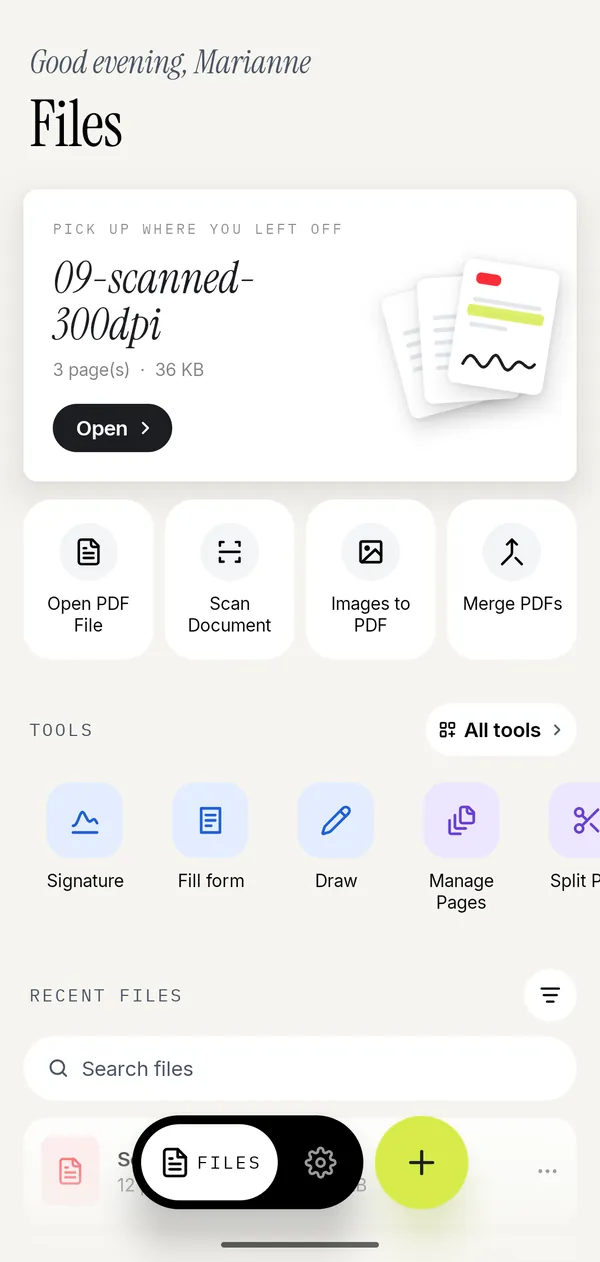
- Open Kyneto PDF and tap Images to PDF.
- Select the photos. Pick them all in one go rather than one at a time.
- On the Arrange Images screen, press and drag a thumbnail to move it. The grid order is the page order.
- Choose a page size: Fit to image, A4 or Letter.
- Choose an orientation (Auto, Portrait, Landscape) and a margin (None, Small, Large).
- Tap Create PDF. The document is saved on the device and opens in the editor.
From there it behaves like any other PDF: reorder pages, crop, compress, sign, or merge it with something else.
Which page size to pick
This is the one choice that decides whether the result looks deliberate or improvised.
| Setting | What happens | Use it when |
|---|---|---|
| Fit to image | The page is exactly the shape of the photo | The images are already the right shape, or nobody will print it |
| A4 | Every page is A4, the image is placed inside | Anything going to an office, a landlord or a government form outside the US |
| Letter | Every page is US Letter | Anything going to a US recipient |
A4 or Letter with a Small margin is the safe answer for a form. Fit to image with None is better for a photo album or a set of screenshots, where white borders look like a mistake.
Photographs of paper deserve the scanner instead
If what you are photographing is a document on a desk, Scan Document produces a far better result than the camera roll. It finds the page edges, straightens the perspective and drops the desk, the hand and the lamp out of the frame. A raw photo of a page keeps all of that, and a letting agent can tell the difference at a glance.
Use Images to PDF for things that are genuinely pictures: a photo of a damaged parcel, a screenshot, a diagram somebody sent in a chat. Use Scan Document for paper, where on-device OCR can also add a searchable text layer.
After the PDF exists
Three things worth doing before you send it:
- Compress it. Photos are heavy, so a six-page PDF made from phone photos can easily be 20 MB. Compressing to a size you type gets it under whatever the upload form allows.
- Crop the pages. If a photo included half the table, Crop pages trims it, and compressing afterwards keeps only the visible area.
- Check the order. Open Manage Pages and look at the thumbnails. Reordering there is a drag; resending the file to a client is not.
Going the other way
The same job in reverse comes up just as often: a PDF you need as images, for a slide, a listing or a chat message. Export as images writes each page out as a JPG or a PNG at a quality you pick. Extract images is different: it pulls out the pictures that were embedded in the PDF at their original resolution, rather than rendering the page. There is a walkthrough of both.
Questions people ask
How do I convert photos to a PDF on Android?
Open Kyneto PDF, tap Images to PDF, select the photos, drag them into order, pick a page size and tap Create PDF. The file is created on the phone with no upload.
Can I put several photos into one PDF?
Yes. Select them all when you pick the images; each one becomes a page, and you press and drag the thumbnails on the Arrange Images screen to set the order.
What page size should I choose?
A4 for most of Europe and the rest of the world, Letter for the United States, Fit to image when the result is not going to be printed.
Does converting photos to PDF reduce the quality?
The images are placed into the pages as they are. Quality only drops if you compress the PDF afterwards, which is a separate step you control.
Is there a limit on how many photos I can add?
No fixed limit. Very large batches of high-resolution photos make a large file, so compress the result before emailing it.
Does this work without an internet connection?
Yes. Images to PDF runs on the device, so it works offline and nothing is uploaded.
Free to download. No account, nothing uploaded.