
Free Adobe Acrobat alternatives for Android in 2026
The short version: most people pay Acrobat for five or six features, and free Android apps cover almost all of them. Kyneto PDF handles merge, split, compress, sign, fill, annotate, redact, watermark and OCR on the device. Xodo is strong on annotation and forms. PDFgear is free and capable. What nothing free replaces: editing the text already inside a PDF, converting to Word or Excel, and certificate-based signatures.
Start by listing what you use rather than what the comparison table advertises. Acrobat has well over a hundred features and the median subscriber uses six.
Which Acrobat feature does what you need replace
| What you pay Acrobat for | Free replacement on Android | Any catch? |
|---|---|---|
| Combine files | Kyneto PDF (Merge PDFs), PDFgear, Xodo | None |
| Organise pages: delete, reorder, rotate | Kyneto PDF (Manage Pages), Xodo | None |
| Compress | Kyneto PDF, with a target size you type | None |
| Fill and sign | Kyneto PDF, Xodo, Acrobat Reader's own free tier | Drawn signature only |
| Comment and highlight | Kyneto PDF, Xodo, Acrobat Reader free tier | None |
| Scan to PDF with OCR | Kyneto PDF (on device), Google Drive (in the cloud) | Scanner may need a one-time download |
| Protect: remove a known password | Kyneto PDF | Cannot add a password |
| Redact | Kyneto PDF, on the device | The redacted pages become images |
| Edit existing text | Nothing free and trustworthy | See below |
| Export to Word, Excel, PowerPoint | Nothing free that is any good | See below |
| Certificate-based or qualified signature | Nothing free | Use your government's own tool |
What the alternatives cost
Nothing here is free in the sense of "no money anywhere". The differences are in what the money buys.
- Kyneto PDF: free to download, every tool available. The free tier limits how many documents you can export; a weekly or yearly subscription removes that limit. Prices are shown in the app before purchase. No account.
- Xodo: free for reading, annotation and most local editing. The Pro tier is advertised in the region of US$8 to US$10 a month on an annual plan. Account optional for local work.
- PDFgear: free, including local editing. Its AI assistant features are server-side.
- iLovePDF and Smallpdf: free tiers with daily task limits. Premium runs roughly US$4 to US$15 a month depending on the product and billing period. Both are web services with an app in front, so the document is uploaded.
- Adobe Acrobat: the free Reader covers viewing, commenting, filling and signing. Acrobat Standard is US$14.99 a month on the annual plan and Pro is US$19.99; month to month they are US$24.99 and US$29.99. The in-app mobile Premium tier is around US$14.99 a month or US$69.99 a year.
Figures compiled on 2026-10-29 from each vendor's pricing page and store listing. They move, they differ by country, and the free-tier limits move most of all. Check the listing before you commit.
The compression example
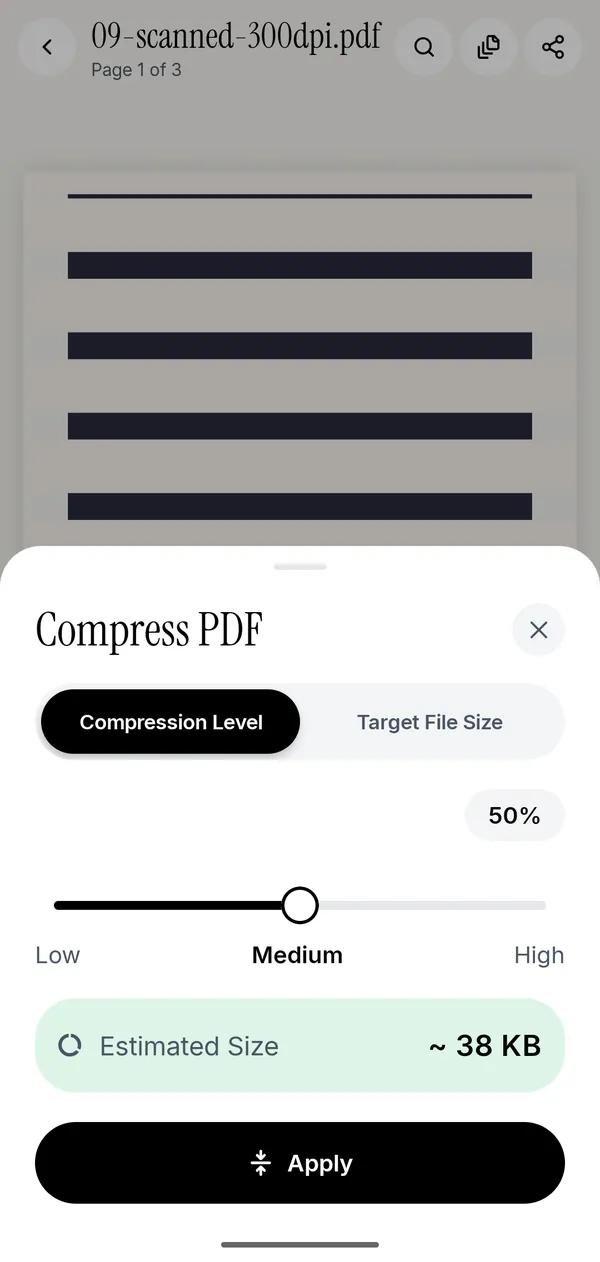
Compression is the clearest case of a paid feature being replaceable, because the free version is actually better designed than the paid one.
Acrobat's mobile compression offers quality presets: high, medium, low. You run it, look at the result, and run it again if the file is still too big. Every web compressor does the same.
Kyneto PDF has the presets too, and a Target File Size field. Type the number the upload form allows and apply once; if the file cannot get that small, the app says so before writing. If compressing would make the file bigger, which happens with text-only PDFs, it keeps the original rather than handing you a worse file. The details are in compressing a PDF to a target size.
The three things that are genuinely not replaceable
Editing the text inside a PDF. This means re-flowing a paragraph and matching an embedded font. Apps that advertise it on Android usually put a white box over the old text and let you type on top, which looks fine until someone selects the text. If you need it, the honest options are Acrobat's Reader Plus tier on mobile, Acrobat Pro on desktop, or LibreOffice Draw, which is free on a computer and opens PDFs for editing.
PDF to Word or Excel. Adobe's conversion is good because it runs on their infrastructure with a lot of trained layout analysis behind it. Free converters produce documents you spend longer fixing than retyping. If you need this once a quarter, a one-month Acrobat subscription is cheaper than your time.
Qualified and certificate-based signatures. A drawn signature is a simple electronic signature, which eIDAS and the ESIGN Act both recognise for ordinary agreements. A notarial deed, some public-administration filings and certain employment paperwork need a qualified electronic signature backed by an identity check: a CIE in Italy, a certificado digital in Spain, an ICP-Brasil certificate in Brazil. No free PDF app issues those. Use the tool your government points you at. More on the distinction in signing a PDF without printing.
Choosing, briefly
- Confidential documents, or no connection: pick something that works on the device. Kyneto PDF, or Xodo with its cloud features switched off. Which apps really work offline goes through the claims one by one.
- Heavy annotation and form work: Xodo has been doing this for a decade and does it well.
- Occasional conversion to Office formats: Acrobat, one month at a time.
- Everything else: the free tier of a local app covers it, and you are not renting your own documents back.
Questions people ask
What is the best free alternative to Adobe Acrobat on Android?
For private documents, an app that processes files on the device. Kyneto PDF covers merge, split, compress, sign, fill, annotate, redact, watermark and OCR locally, free to download, with a limit on how many documents the free tier exports.
Can I replace Adobe Acrobat completely?
For most everyday PDF work, yes. Not for editing the text already in a document, converting to Word or Excel, or applying a certificate-based signature.
Is there a free PDF editor for Android that does not upload files?
Yes. Kyneto PDF has no server that receives documents, so nothing is uploaded. PDFgear's local editing is also free and local. iLovePDF and Smallpdf upload by design.
Why is Adobe Acrobat so expensive?
It is sold as a professional tool with desktop, web and mobile apps, cloud storage, conversion services and e-signature workflows behind it. If you use a sixth of that, you are paying for the other five sixths.
Does the free Adobe Acrobat Reader let me edit PDFs?
It lets you view, comment, highlight, fill forms and sign. Creating, editing, exporting, combining, organising and compressing need a paid tier.
Are free PDF apps safe for confidential documents?
Only if the document stays on the phone. Check whether the app uploads, and whether it needs an account. An app with no server and no account has nothing to leak.
Free to download. No account, nothing uploaded.