
PDF too large to email? Limits and three fixes
A PDF is too large to email when it is over your mail service's limit, which for personal accounts is 20 to 25 MB: Gmail allows 25 MB of attachments, Outlook.com 25 MB for the whole email, Yahoo Mail 25 MB, and iCloud Mail 20 MB per message. There are three fixes that keep it an attachment: compress the PDF to a size under the limit, split it into parts that each fit, or remove the pages nobody asked for. All three run on a phone.
The fourth option is to send a link instead of the file, which your mail app may already be offering.
The limits, service by service
| Service | Limit (personal accounts) | What happens above it |
|---|---|---|
| Gmail | 25 MB of attachments | Gmail removes the attachment and puts a Google Drive link in the email instead |
| Outlook.com | 25 MB for the whole email, text included | Links to OneDrive files do not count; a linked file can be up to 2 GB |
| iCloud Mail | 20 MB per message | Apple's Mail can send it with Mail Drop instead, up to 5 GB |
| Yahoo Mail | 25 MB for all attachments in one message | The same limit applies to mail you receive |
Checked on 2026-11-10 against Google's Gmail Help, Microsoft Support, Apple Support and Yahoo Help.
Three things make the real limit lower than the number in the table:
- Work and school accounts are set by the administrator. Classic Outlook for Windows also has its own default of 20 MB for internet accounts, and Exchange servers default to 10 MB unless the admin changed it, which is the usual reason a PDF is "too large to send in Outlook" at work.
- Encoding adds weight. Attachments are encoded for sending, and Google's Workspace documentation puts the increase at about 37%. Outlook.com counts the text of the email too.
- The recipient has a limit as well. Apple warns that a recipient's mail service may have a smaller limit than yours. A 24 MB PDF that leaves Gmail can still bounce at a company mail server.
Aim comfortably under the number, not just under it.
Compress the PDF under the limit
- Open the PDF in Kyneto PDF with Open PDF File, or share it to the app from Files, Mail or your file manager.
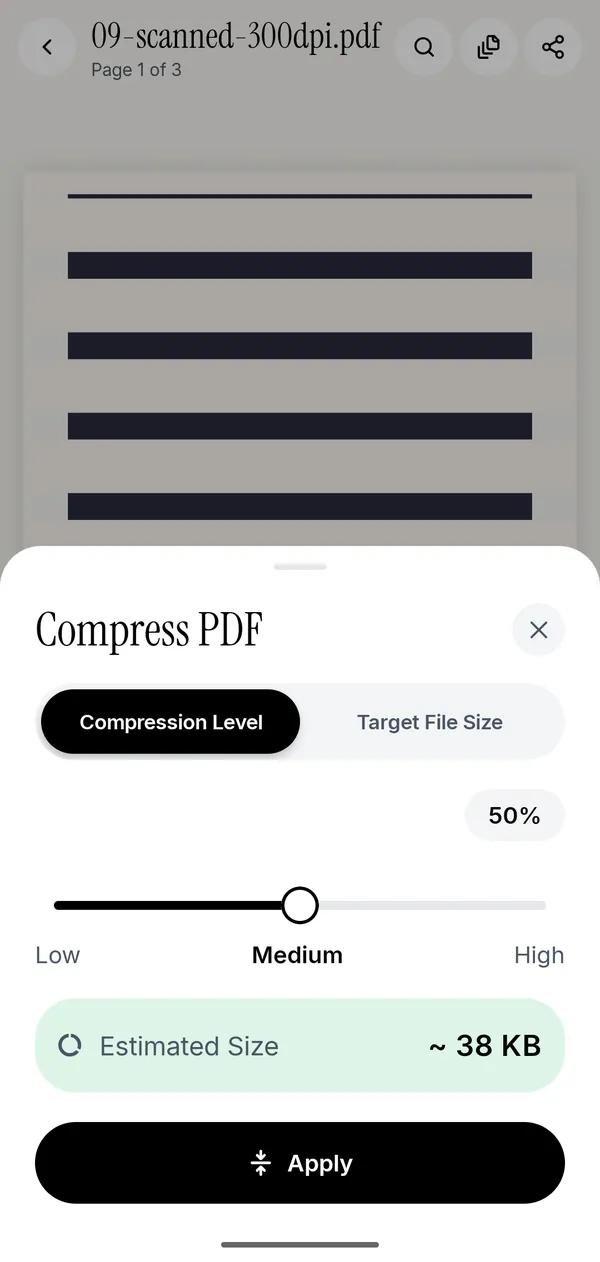
- Tap All tools, then Compress PDF under Convert & optimize.
- Tap Target File Size and type a number well under the limit in megabytes, such as 15 for a 25 MB cap.
- Tap Apply.
- Tap the share icon and choose Share, then your mail app.
The sheet shows the file's Current Size next to the field. If the target cannot be reached, the app tells you before it runs: "Compression only shrinks images, so this PDF can't go below about" a given size. Use whole numbers or a full stop for decimals.
If you would rather choose a quality than a number, stay on Compression Level. Its Low, Medium and High slider shows an Estimated Size before anything is written.
Compression has a cost worth knowing about. Every page is turned into a JPEG image, so text is no longer selectable or searchable, and form fields and links are lost. For an email attachment that someone will read, that is usually fine. For a form the recipient has to fill in, split it instead. The guides to compressing a PDF on iPhone and compressing to a target size on Android go through the trade-offs in detail.
When compression is not enough
Split by file size. Split PDF with File size cuts the document into parts that each stay under the Maximum size per file you type, at full quality. Send each part in its own email. If one page is bigger than the limit on its own, the app says so and suggests compressing first. Splitting a PDF on iPhone covers the other split modes.
Drop the pages nobody asked for. A 40-page report where the recipient needs the summary and the appendix is mostly dead weight. Remove the rest in Manage Pages, or extract the pages you need as a new file. On iPhone, the built-in Preview app can delete pages too.
Built-in options on iPhone and Android
- Mail Drop (iPhone). When a message is over your provider's limit, Apple's Mail offers to send the attachments with Mail Drop instead. The file is uploaded to iCloud and the recipient gets a link that expires after 30 days.
- Preview's Export (iPhone, iOS 26 and later). Exporting a PDF from Preview offers switches that shrink the images inside it, but no field for a target size.
- Shortcuts (iPhone). The Optimize File Size of PDF action compresses a PDF's images. Results vary with the document.
- Files' Compress (iPhone). This makes a ZIP archive, not a smaller PDF, and the person receiving it has to unzip it.
- Gmail (Android and iPhone). Over 25 MB, Gmail switches to a Google Drive link on its own.
A link is the right answer for a big file someone just needs to read. An attachment is the right answer when it has to go into a portal, an archive or a system that only takes files.
Questions people ask
Why is my PDF too large to email?
Because it is over your mail service's limit, usually 20 to 25 MB, or over the recipient's. Scanned documents are the usual cause, since every page is a photograph.
How do I compress a PDF that is too large to email?
Open it in Kyneto PDF, choose Compress PDF, switch to Target File Size, type a number well under the limit and tap Apply. Everything happens on the phone, so the document is not uploaded anywhere.
What is the maximum PDF size for Gmail?
25 MB of attachments for a personal Gmail account, checked on 2026-11-10. Over that, Gmail sends a Google Drive link instead of attaching the file.
What is the attachment limit in Outlook?
Outlook.com allows 25 MB for the whole email, including the text. Classic Outlook for Windows defaults to 20 MB for internet accounts, and work accounts on Exchange often default to 10 MB.
My PDF is too large to email from my iPhone. What can I do?
Let Mail send it with Mail Drop, compress it to a target size, or split it by file size and send the parts. Kyneto PDF does the compressing and splitting on the iPhone.
Can I send a large PDF without compressing it?
Yes, as a link: a Google Drive link in Gmail, a OneDrive link in Outlook.com, or Mail Drop in Apple's Mail. Splitting by file size also keeps the original quality.
Free to download. No account, nothing uploaded.